
How to claim your business on ChatGPT, step by step
 By Jero Shannon Published
OpenAI has opened Business Hub, a dashboard to claim your business on ChatGPT and see how often it is mentioned. We did it for ours and for several clients: the steps, the verification and the stumbling blocks.
ChatGPT already recommends businesses when someone asks for a physiotherapist, an accountant or a place to eat. Until now there was no way to tell it who your business really is. OpenAI has just opened Business Hub, a dashboard where you claim your listing, complete your details and see how many times your business shows up in answers.
Today we did it for our own business and for several clients. This is what you have to do, what we were asked at each step and where we got stuck.
What Business Hub is, and what it is not
It is an OpenAI dashboard at chatgpt.com/business-hub, also reachable from ChatGPT's sidebar. It does three things: it lets you claim a business that already exists in ChatGPT, add its information (description, website, category, logo and policies) and check the statistics for the last 28 days: mentions, profile views and clicks to your website. So far we haven't paid anything: our account is the free one.
What it is not: a button to rank first. OpenAI's own help page says that claiming a business does not by itself increase its visibility or give you control over what ChatGPT recommends on its own. It is the groundwork, not the result.
Before you start
A ChatGPT account. The free one works. A company account is better than someone's personal one, because the listing will be tied to it.
Access to one of three things: your domain's DNS, the company phone or the company email. That is what you will be asked for to prove the business is yours.
Your details at hand, identical to your Google listing: name, address, phone and website. If they don't match, you will repeat in ChatGPT a problem you already had on Google.
Step by step
1. Go in and search for your business. Open chatgpt.com/business-hub with your account and type the company name. Many businesses already appear, with the address and website ChatGPT already knew. If you see yours, select it. If it isn't there, the «+» option to create it only appears for some types of business.
2. Press «Start». ChatGPT asks which account will manage it and warns you that by continuing you accept OpenAI's business terms. Read them before going on.
3. Choose how to prove it is yours. The methods change depending on the listing. We saw two:
Your website domain. ChatGPT gives you a TXT record: the name is «openai-business-claim» and the value is a long code. You add it to your domain's DNS and press «Verify domain». It is the cleanest method if you control the DNS. If someone else manages it, send them the details exactly as they are: changing a single character makes it fail. The record expires after 24 hours.
Company phone. They send you a code by WhatsApp or an automated call. In Spain SMS is not available, and the screen itself says so. Careful: the code goes to the number shown on the listing, which isn't always the one you think.
OpenAI's help page also mentions company email and Shopify stores as possible methods. They did not show up on our listings.
4. Wait for the review. OpenAI reviews the request and sends you its decision by email. In our case the listing appeared in the dashboard within a few minutes, but it is worth watching the account's inbox before treating it as done.
5. Verify your identity. This is the step we did not expect. Before you can edit anything, ChatGPT asks the person managing the listing to verify their identity with an official document, sometimes with a selfie too, through an external provider. It has to be someone who represents the company, and the legal name must match the official registry. Until then you can see the statistics, but you can't change anything.
6. Complete the listing. Description, category, website, logo and policies. The help page warns that the profile is published as soon as the verification is approved, so check it before you accept.
What you will see
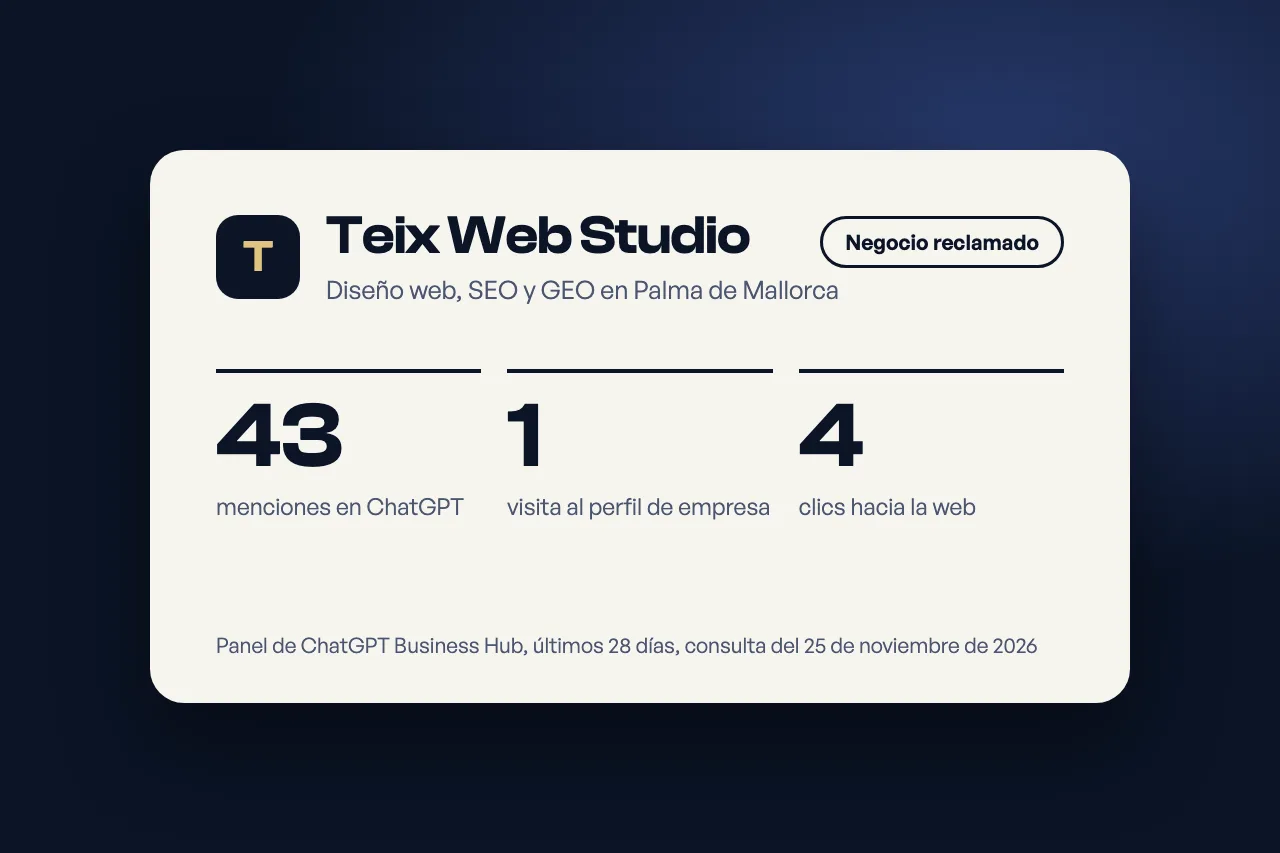
The dashboard shows, for the last 28 days, how many mentions your business has, how many times the profile was viewed and how many clicks reached your website. On our listing, as of 25 November, it shows 43 mentions, 1 profile view and 4 clicks to the website.
They are small numbers, but they are the first a business can see about how ChatGPT treats it, and they let you compare month by month. If a metric is blank, OpenAI says it can mean a lack of data rather than zero.
Today's stumbling blocks
A business with several offices has one listing for each, and each listing is claimed separately, even if the website is the same.
A listing already claimed by someone else won't let you claim it: it says «contact support». OpenAI offers a way to dispute ownership from the listing's menu.
There are limits by type of business and by country. OpenAI's help page currently restricts some things, such as physical shops and restaurants, to US listings. We were able to claim service businesses in Palma.
The business agent, the chat that answers your customers on your behalf, we haven't tried. The help page limits it to online shops and services that meet its conditions.
What to do next
Claiming the listing is the first step, not the last. Whether ChatGPT cites you depends mostly on your website, your Google listing and what others say about you telling the same story. We explain it in how to get ChatGPT to recommend your business and in what GEO is. To see how it sees you today, you can use our free AI visibility test.
If you'd like us to look at it together, write to us on the contact page.
Keep reading
Related articles